
Students in 2026 have more AI help than any generation before them. Used well, these tools can explain hard topics, organize notes, improve writing, and make revision faster. Used badly, they can hurt learning and break academic integrity rules.
This guide covers the best AI tools for students in 2026, what each one does best, and how to use them responsibly.
What to Look for in an AI Tool for Students
Before the list, here is what makes an AI tool worth using:
- Accuracy: it should explain concepts clearly and admit when it is unsure.
- Ease of use: you should not need a tutorial to start.
- Value: a useful free plan or a student discount.
- Privacy: be careful about uploading personal or sensitive documents.
- Learning support: the best tools help you understand, not just give answers.
1. AI Chat Assistants (All-Round Study Help)
Claude
Claude is a strong general-purpose assistant for students. It can explain tough concepts step by step, help outline essays, give feedback on your writing, summarize long readings, and help debug code. It handles long documents well, which is useful for research papers and lecture notes.
Best for: explanations, writing feedback, summarizing, coding help.
ChatGPT
ChatGPT remains one of the most popular AI assistants. It is useful for brainstorming, practice questions, language learning, and quick explanations on almost any subject.
Best for: brainstorming, Q&A practice, language practice.
Google Gemini
Gemini works well if you already live in Google’s ecosystem (Docs, Drive, Gmail). It helps with research, summaries, and organizing study material.
Best for: students who use Google Workspace.
2. AI Tools for Research and Reading
Perplexity
Perplexity combines AI answers with sources, so you can check where information comes from. That makes it handy for early-stage research and fact-checking.
Best for: quick research with source links.
Elicit
Elicit is built for academic research. It helps you find and summarize scientific papers, which makes literature reviews much faster.
Best for: college and postgraduate research.
Consensus
Consensus searches peer-reviewed studies and shows what the research says on a question. It is useful for evidence-based assignments.
Best for: finding scientific evidence quickly.
3. AI Note-Taking and Study Tools
NotebookLM
NotebookLM by Google lets you upload your own notes, PDFs, and sources, then ask questions about them. It can create summaries and study guides based only on your material.
Best for: turning your notes and textbooks into study guides.
Notion AI
Notion AI helps you organize notes, build study plans, and summarize pages inside your Notion workspace.
Best for: students who manage everything in Notion.
Otter.ai
Otter.ai records and transcribes lectures and meetings, so you can focus on listening instead of typing. Always ask for permission before recording a class.
Best for: lecture transcription and review.
4. AI Writing and Grammar Tools
Grammarly
Grammarly checks grammar, spelling, tone, and clarity. It is useful for essays, emails, and applications.
Best for: proofreading and polishing your writing.
QuillBot
QuillBot helps you rephrase sentences, summarize text, and improve clarity. Use it to improve your own writing, not to disguise copied work.
Best for: paraphrasing your own drafts and summarizing.
Hemingway Editor
Hemingway highlights long, complicated sentences and encourages simple, readable writing.
Best for: making essays clearer and easier to read.
5. AI Tools for Math, Science, and Coding
Wolfram Alpha
Wolfram Alpha solves math, physics, and chemistry problems and shows steps, which helps you learn the method.
Best for: math and science problem solving.
Photomath
Photomath lets you scan a handwritten or printed math problem and see step-by-step solutions.
Best for: school-level math practice.
GitHub Copilot
Copilot suggests code as you type and helps explain what code does. It is useful for computer science students, but make sure you understand the code you submit.
Best for: programming students.
6. AI Flashcards and Revision Tools
Quizlet
Quizlet uses AI features to create flashcards, practice tests, and study modes from your material.
Best for: memorization and exam revision.
Anki
Anki uses spaced repetition, which is one of the most effective ways to remember information long term. Many add-ons and AI helpers can generate cards for you.
Best for: medical, language, and other memory-heavy subjects.
7. AI Presentation and Productivity Tools
Canva (Magic Studio)
Canva’s AI features help you create presentations, posters, and infographics quickly.
Gamma
Gamma turns your ideas or outlines into polished slide decks in minutes.
Todoist and Motion
These tools use smart scheduling to plan your assignments, deadlines, and study sessions.
Best for: presentations, planning, and time management.
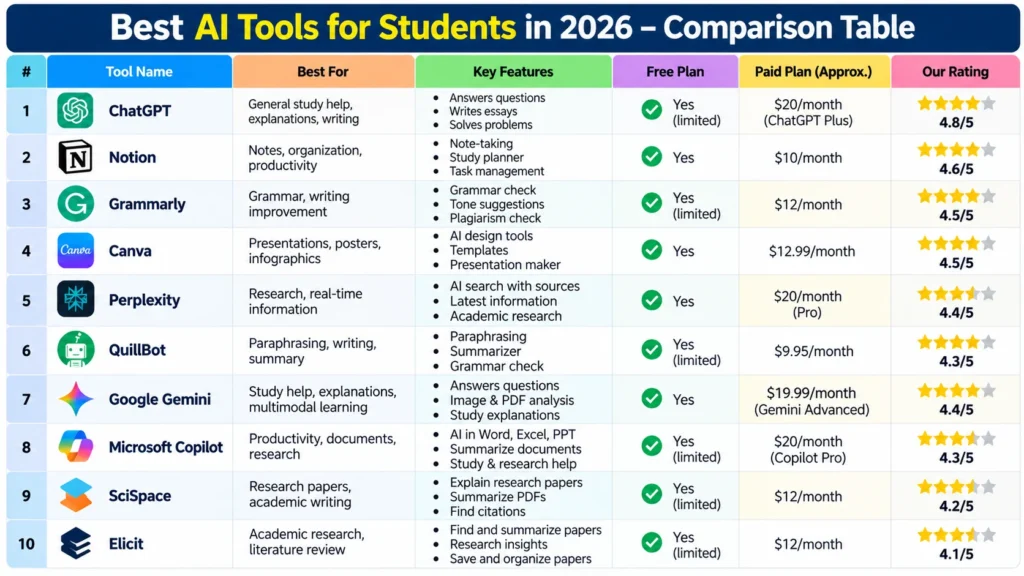
Quick Comparison Table
| Need | Recommended Tools |
| General study help | Claude, ChatGPT, Gemini |
| Research | Perplexity, Elicit, Consensus |
| Notes and summaries | NotebookLM, Notion AI, Otter.ai |
| Writing | Grammarly, QuillBot, Hemingway |
| Math and coding | Wolfram Alpha, Photomath, GitHub Copilot |
| Revision | Quizlet, Anki |
| Presentations | Canva, Gamma |
Features and pricing change often, so check each tool’s website for the latest plans and student discounts.
How to Use AI for Studying the Right Way
- Use AI to understand, not to copy. Ask it to explain a topic in simple words, then write your own answer.
- Verify facts. AI can make mistakes. Cross-check important information with textbooks or trusted sources.
- Follow your school’s AI policy. Rules differ between schools and universities. When unsure, ask your teacher.
- Protect your privacy. Avoid sharing personal data, passwords, or private documents.
- Test yourself. Ask AI to quiz you on a chapter, then answer without looking.
- Keep your own voice. Your assignments should reflect your own thinking and effort.
Frequently Asked Questions (FAQs)
What is the best AI tool for students in 2026?
There is no single best tool. Claude, ChatGPT, and Gemini are strong all-rounders, while Perplexity, NotebookLM, and Grammarly are excellent for specific tasks.
Are there free AI tools for students?
Yes. Many tools, including Claude, ChatGPT, Gemini, Perplexity, NotebookLM, Quizlet, and Anki, offer free plans or free versions with limits.
Is it safe to use AI for homework?
It is safe when you use it to learn, such as asking for explanations, feedback, and practice questions. It becomes a problem when you submit AI-generated work as your own, which many schools treat as plagiarism.
Which AI tool is best for writing essays?
Claude and ChatGPT help with outlining and feedback, and Grammarly is great for proofreading. Write the essay yourself and use AI as a guide.
Can AI help me prepare for exams?
Yes. You can create flashcards, practice quizzes, and summaries, and use spaced repetition tools like Anki for long-term memory.
Conclusion
The best AI tools for students in 2026 save time, simplify complex topics, and make studying more organized. Pick two or three tools that match your needs, such as one assistant, one note tool, and one revision tool, and build a simple routine around them. AI works best as a study partner, not a shortcut.

My name is Anaya Afrin, the founder of Seekho Smart. I built this platform to make knowledge simple, clear, and truly useful for students and readers everywhere. With over 6 years of blogging experience, I’ve learned how to turn complex topics into easy guides that inspire learning. Through my writing, I aim to share practical knowledge that not only informs but also empowers people to grow and achieve their goals.